Colour Picker
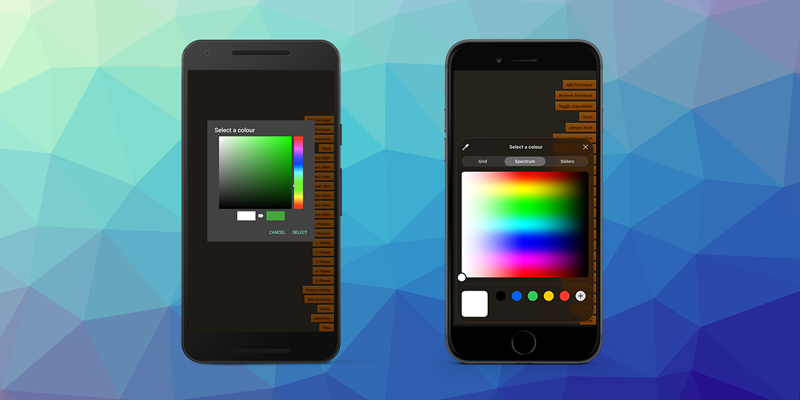
The colour picker dialog presents a UI that allows the user to select a colour on a spectrum.
Colour pickers are created using an ColourPickerDialogBuilder.
var builder:ColourPickerDialogBuilder = new ColourPickerDialogBuilder()
    .setTitle( "Select a colour" )
    .addOption( "Select", DialogAction.STYLE_POSITIVE )
    .addOption( "Cancel", DialogAction.STYLE_CANCEL );

var picker:DialogView = Dialog.service.create( builder.build() );
picker.addEventListener( DialogViewEvent.CLOSED, colourPicker_closedHandler );
picker.show();


function colourPicker_closedHandler( event:DialogViewEvent ):void
{
	var picker:DialogView = DialogView( event.currentTarget );
    picker.removeEventListener( DialogViewEvent.CLOSED, colourPicker_closedHandler );
    picker.dispose();

    // Returns a hex string in #RGBA format eg #FF0000FF
    var hexString:String = event.values[0];
}
Initial Colour
You can set the initial colour shown in the dialog by passing an ARGB integer to the setInitialColour() method on the builder.
For example to set the initial colour to red:
builder.setInitialColour( 0xFF0000 );
Alpha
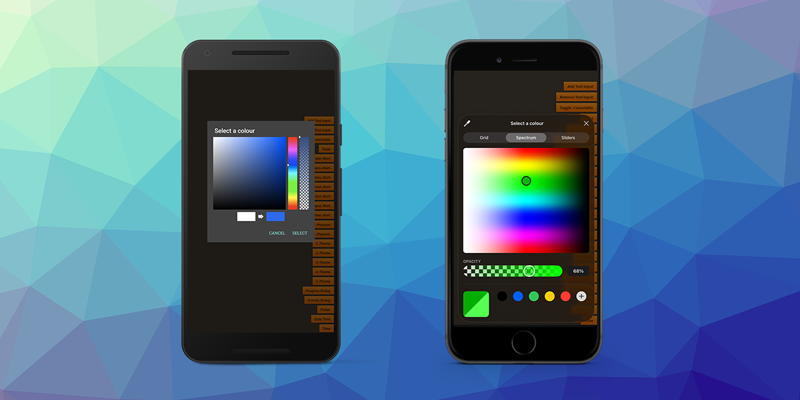
You can allow the user to set the transparency of the colour by enabling alpha support:
builder.supportsAlpha( true );
This will display an addition slider bar for the user to select the transparency.
Helpers
Conversion
You can easily convert the returned colour hex string to an int by using something like the following function:
function rgbaHexToARGBInt( hex:String ):uint
{
    hex = hex.replace( /^#/, "" );
    if (hex.length == 8)
    {
        var v:uint = parseInt( hex, 16 );      // RRGGBBAA
        var a:uint = v & 0xFF;                 // AA
        var rgb:uint = v >>> 8;                // 00RRGGBB
        return (a << 24) | rgb;                // AARRGGBB
    }
    else if (hex.length == 6)
    {
        return 0xFF000000 | parseInt( hex, 16 ); // assume fully opaque
    }
    throw new Error( "Invalid hex format" );
}